More FPS for every player, and a server that streams less
rm_optimizer gives every player on your server an FPS menu that goes further than the game's own settings, and gives you a scan that finds what makes your server heavy, with a one click fix for oversized textures. FiveM and RedM in one resource, no framework, no database.
See it in action
Watch the video on YouTube
The FPS menu (/fps or F10)
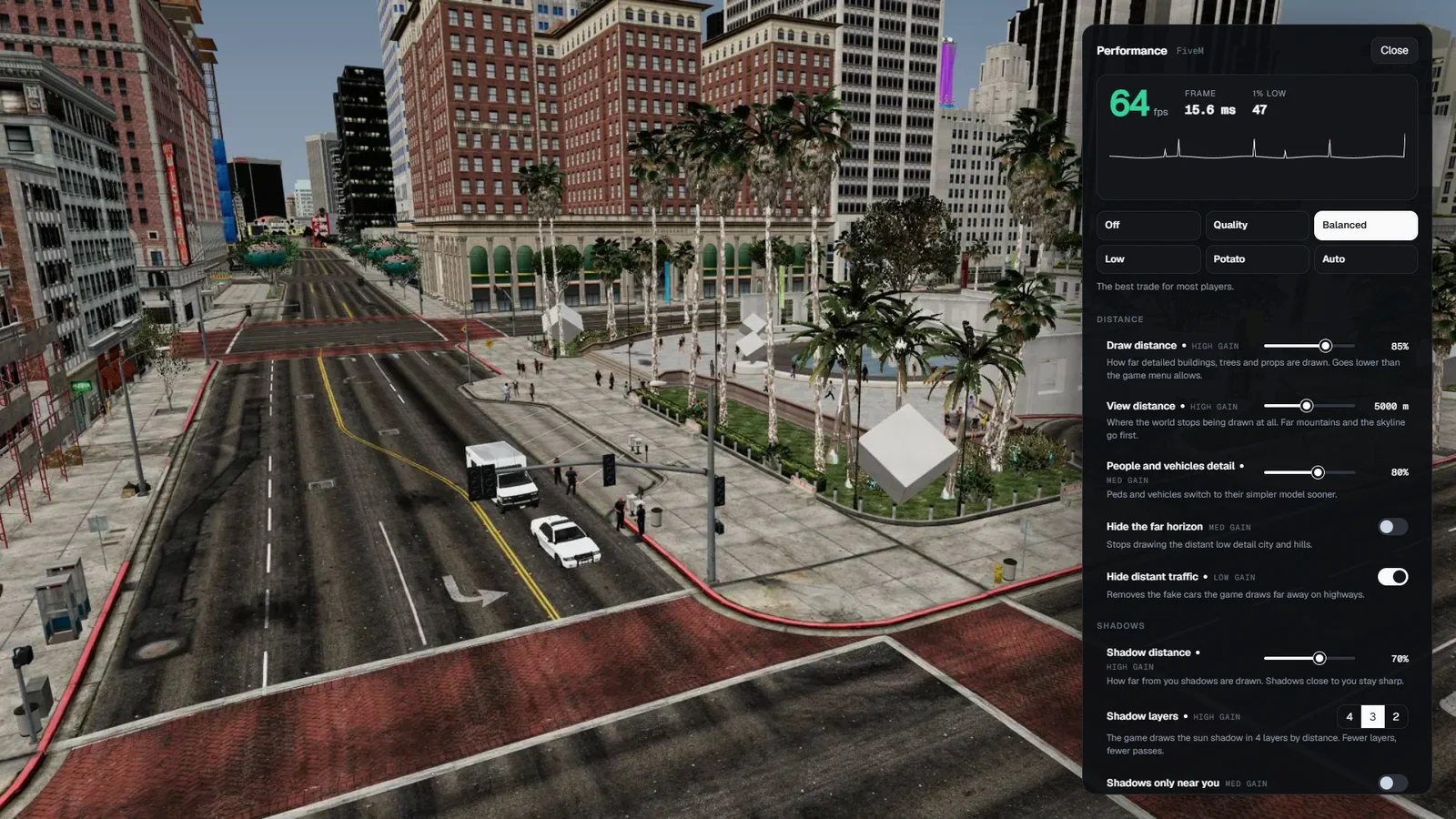
- Every player opens it with F10 (FiveM, players can rebind it) or /fps. It sits on the right of the screen, so the game stays visible and every change shows at once.
- Presets: Off, Quality, Balanced, Low, Potato and Auto. Change any option after a preset and it becomes Custom.
- Live readout: FPS coloured against the target, frame time, the 1% low of the last 10 seconds and a graph of every frame of the last 4 seconds, with the slow frames marked red.
- Each option shows its usual gain (High, Med, Low). Off is always the game exactly as it ships.
- Settings are saved per player on your server. An optional FPS counter in the corner while the menu is closed.
Goes below the game menu (FiveM)
- Distance: draw distance lower than the pause menu allows, view distance from 10,000 m down to 600 m, people and vehicles detail, hide the far horizon, hide distant traffic.
- Shadows: shadow distance, shadow layers (4, 3 or 2), shadows only near you, sharp shadow edges, no shadows from lamps and headlights.
- Lights and effects: cheap reflections and no water reflections, set up with values taken from Rockstar's own lighter settings for heavy missions. Hide distant lights, effects distance, no bullet holes and blood, no fog volumes.
- Population: pedestrians and traffic, with a floor you set.
- Video memory: low video memory mode for 2 to 4 GB graphics cards.
Built in benchmark
- Stand still somewhere busy and press Run benchmark: 10 seconds with every option off, then 10 seconds with the player's own settings, in the same spot.
- The result shows the average and the 1% low of both, with the difference. The real gain on that player's PC, not a number from a video.
Auto and the smart rules
- Auto checks the frame rate every 2 seconds and lowers distances and effects step by step when it stays under the target (30 to 144 fps), then raises them again when there is room. It moves slowly on purpose, so nothing flickers, and never goes under your limits.
- Lighter while moving fast: draw distance and effects drop a step above 90 km/h.
- Lighter inside buildings (FiveM): inside an interior the outside world is drawn shorter.
- Fair play: while a player aims or shoots, draw distance and detail go back to at least normal, so a low setting cannot be used to see through trees and fences in a fight. You can switch that off in cfg.lua.
Works with your other scripts
- Never clears another script's screen effect, weather or lights. That is where most FPS scripts break servers.
- View distance, shadow layers and reflections use the game's second effect slot, never the main one. If another script is using that slot, those three wait and the menu says so.
- Every setting is written only when it changes and put back when the resource stops.
RedM
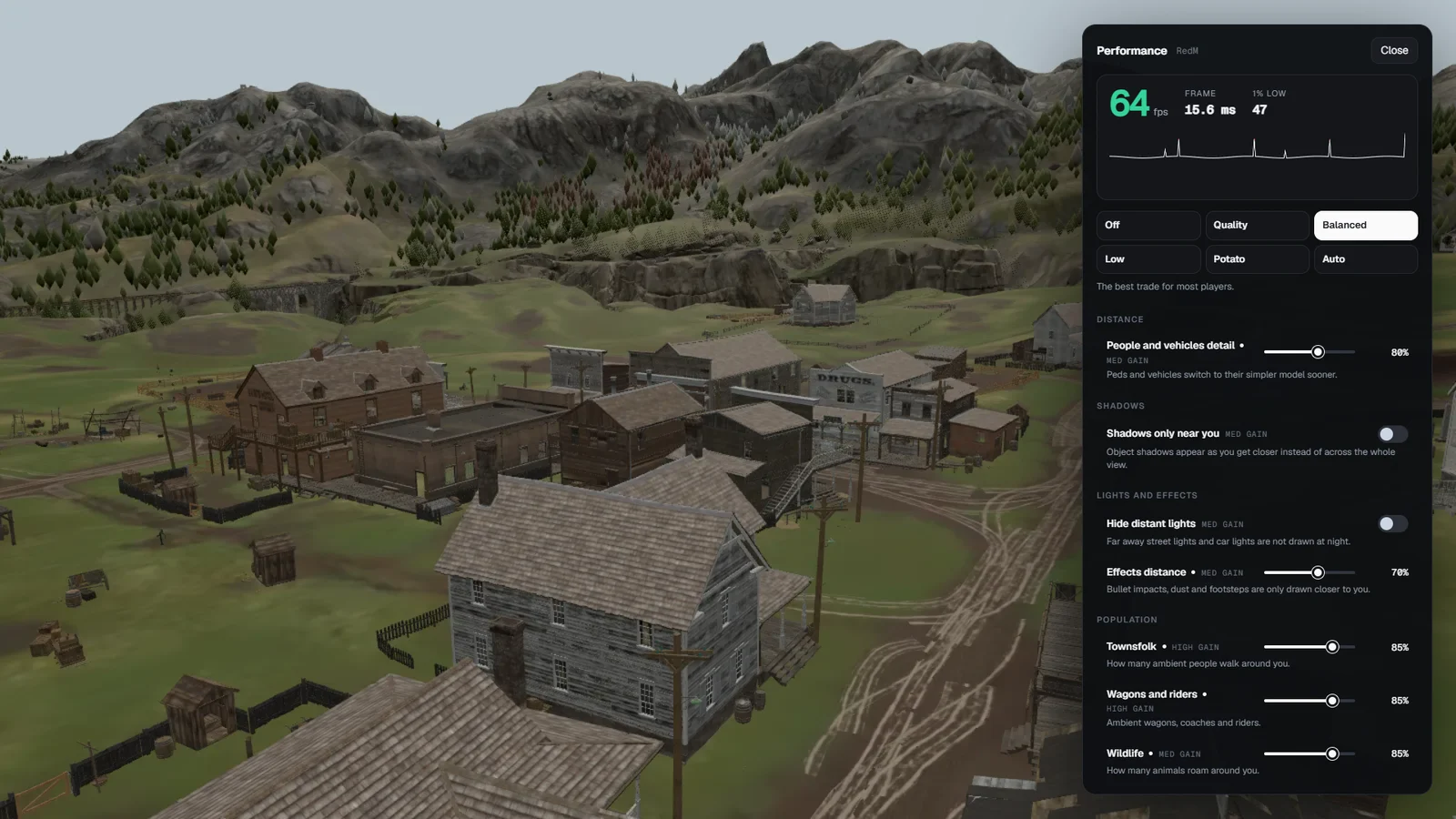
- RedM lets scripts change fewer of these settings, so the menu only shows what works there: people and vehicles detail, shadows only near you, hide distant lights, effects distance, townsfolk, wagons and riders, wildlife, Auto with a target frame rate, lighter while moving fast and the FPS counter.
- The same presets, the same live readout and the same benchmark. Open it with /fps.
The server scan (for you)
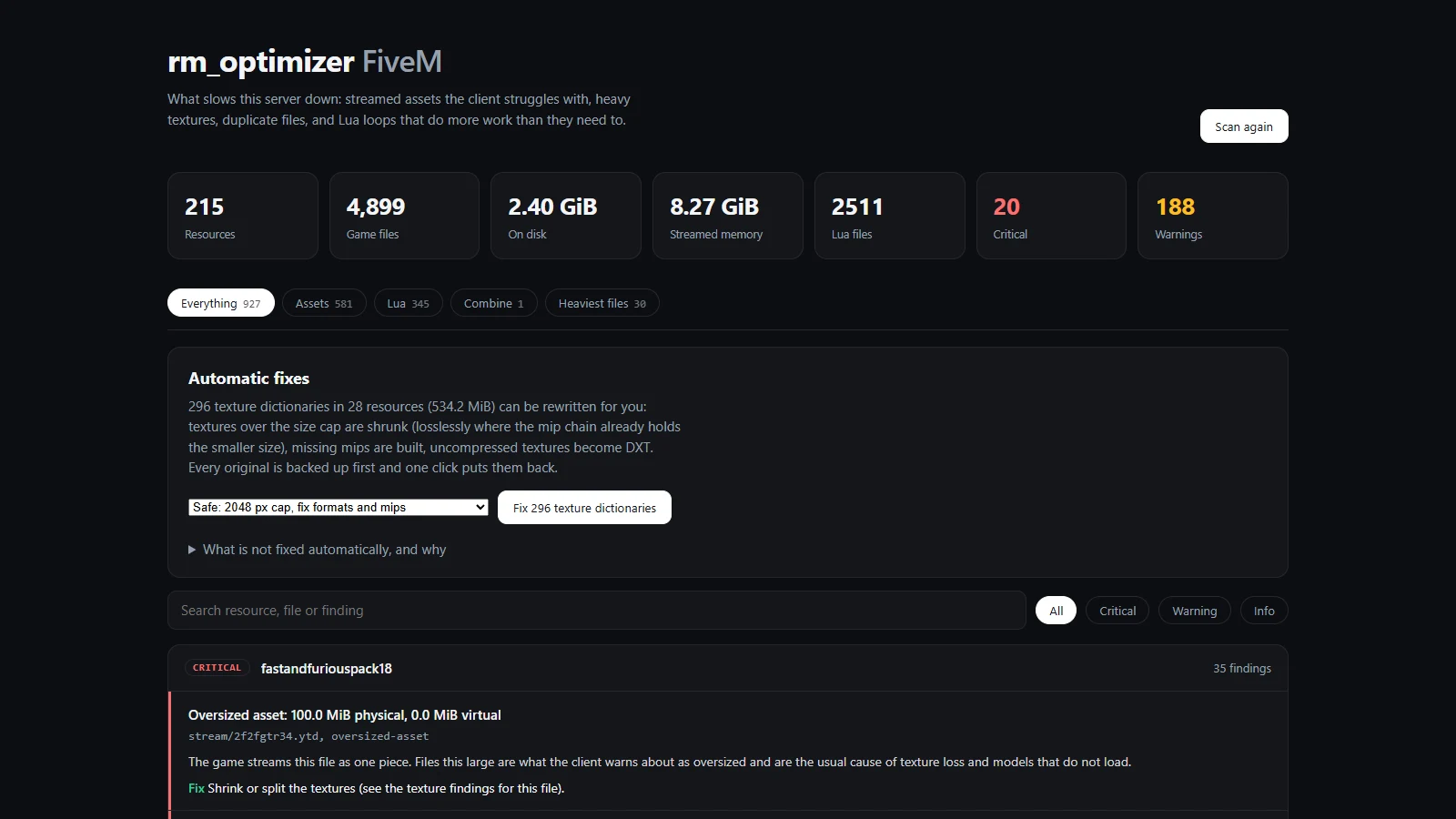
- Run
optimizer scan in the server console and open the report in your browser, or in game with /optimizer for staff with the ace. - Assets: every streamed file of every started resource, biggest first, with the memory it costs.
- Textures (FiveM): texture dictionaries with textures over 2048 px, without mipmaps or not compressed, with how much a fix saves.
- Models (FiveM): the triangle count of every streamed car, weapon, ped and prop, against the heaviest model GTA V itself ships of the same kind, plus every car without lower detail levels. You see which models to replace.
- Duplicates: the same file in two resources, and one file name streamed by two resources with different contents.
- Lua: loops that never wait, Wait(0) loops calling costly natives, network events every frame, threads or handlers created inside a loop, database calls in loops. Each finding names the file and the line.
- Combine (FiveM): five or more resources that are only cars (or only weapons) can be merged into one, written next to the originals, which are never touched.
- In game: a live strip of your FPS, frame time, p95 and worst frame with the ped, vehicle and object counts, and What is here?, which counts every object within 150 m by model and names the resource that streams it, heaviest first.
Fix textures in one click
- Fix textures on the report (or
optimizer fix safe|balanced|strict) shrinks oversized textures, builds missing mipmaps and compresses uncompressed ones. Two Fast and Furious packs went from 100 MiB to 15 MiB and from 50 MiB to 13.5 MiB of game memory. - A file is only replaced when the result is smaller, the original goes to a backup folder first, and
optimizer undo puts it back. - Not changed automatically, on purpose: heavy models, duplicates and name clashes (which copy to keep is your call), Lua logic, escrowed files and RedM texture dictionaries. Those are reported with the fix to make.
Details
- FiveM and RedM: one resource, one package.
- Frameworks: none needed. Works on Qbox, QBCore, ESX, VORP, RSG or standalone.
- Requires: nothing. No database, no other resource, OneSync not required.
- Permissions: the FPS menu is for every player. The scan opens in game only for the
command.optimizer ace, and in the browser only with the report key. - Your limits: in cfg.lua you set the default preset, the lowest draw distance, view distance and population players can pick, and the options they cannot touch.
- Code: escrow protected. cfg.lua is open and editable: command, key, default preset, the lowest values players can pick, the population sliders and the options you switch off.
- Not possible from a script: the game's own texture quality, MSAA and grass quality (players keep setting those in the pause menu, rm_optimizer works on top), and the CPU cost per resource (that is
resmon 1 in F8). - Payment: one time, no subscription.
- Docs: docs.rainmad.com/resources/server-optimizer-fivem-and-redm
- Support: discord.gg/rainmad
🔥 Use code WELCOME20 for 20% off your first purchase.
Watch the video before you buy.
![Server Optimizer + FPS Boost Menu [FiveM]](https://dunb17ur4ymx4.cloudfront.net/packages/images/b361c36ba730913e33f4d3612ad3bac0ffb0c595.png)
